

Integration with PulPal prefix
Suitable for integration where the unique ID is used for payments on the Merchant's side. PulPal on its side adds a prefix — a numeric or text value that is used on our side so the Payer can identify himself at the terminal and use his ID. Example: XXX-1234 (where XXX is a prefix, and 1234 is a unique ID in the Merchant's system)
| Designation | |
|---|---|
| [DEPRECATED] | Obsolete parameter that will be removed in one of the next updates |
Test and product environments
PulPal provides a test environment for testing integration elements. Login options for the test account will be provided via email; an account for the product environment will be created during conclusion of the contract.
| Link to the merchant’s personal account (test environment) |
|---|
| https://merchant-dev.pulpal.az |
| Link to the merchant’s personal account (product environment) |
|---|
| https://merchant.pulpal.az |
Menu (avatar) > Company Profile
In the “Company Profile” section, select the “Settings” tab.
Here you must specify the following parameters:
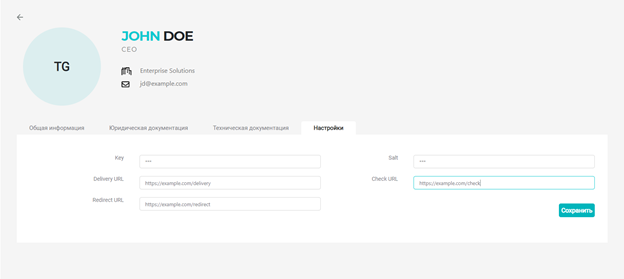
| Parameters | Description |
|---|---|
| Delivery URL | Used to notify your service of payment made. |
| Check URL | Used to obtain data about your product or service. |
| Redirect URL | Used to redirect user after successful online payment. If the value is not specified, then, after successful payment, the user will be redirected to the PulPal main page. |
| Key | Key for signature, provided by the merchant. |
| Salt | “Salt” to verify the merchant, provided by the merchant. |
Request Description
Delivery
curl --location --request POST 'https://merchant.az/api/delivery' \
--header 'Signatire: 7bcP2M98mKku6W+KSurrkuyY3PGhiKsdzfrhjs85CIw=' \
--header 'Content-Type: application/json' \
--header 'Nonce: 1' \
--data-raw '{
    "price": "10000",
    "productType": 3,
    "externalId": "111111",
    "debt": 0,
    "amount": 2,
    "providerType": 1,
    "paymentAttempt": "df922726-c5c6-41c2-b2ff-dfac9022a473"
}'
var myHeaders = new Headers();
myHeaders.append("Signature", "7bcP2M98mKku6W+KSurrkuyY3PGhiKsdzfrhjs85CIw=");
myHeaders.append("Content-Type", "application/json");
myHeaders.append("Nonce", "510");

var raw = JSON.stringify({
  price: "10000",
  productType: 3,
  externalId: "111111",
  debt: 0,
  amount: 2,
  providerType: 1,
  paymentAttempt: "df922726-c5c6-41c2-b2ff-dfac9022a473",
});

var requestOptions = {
  method: "POST",
  headers: myHeaders,
  body: raw,
  redirect: "follow",
};

fetch("https://merchant.az/api/delivery", requestOptions)
  .then((response) => response.text())
  .then((result) => console.log(result))
  .catch((error) => console.log("error", error));
<?php

$curl = curl_init();

curl_setopt_array($curl, array(
  CURLOPT_URL => 'https://merchant.az/api/delivery',
  CURLOPT_RETURNTRANSFER => true,
  CURLOPT_ENCODING => '',
  CURLOPT_MAXREDIRS => 10,
  CURLOPT_TIMEOUT => 0,
  CURLOPT_FOLLOWLOCATION => true,
  CURLOPT_HTTP_VERSION => CURL_HTTP_VERSION_1_1,
  CURLOPT_CUSTOMREQUEST => 'POST',
  CURLOPT_POSTFIELDS =>'{
    "price": "10000",
    "productType": 3,
    "externalId": "111111",
    "debt": 0,
    "amount": 2,
    "providerType": 1,
    "paymentAttempt": "df922726-c5c6-41c2-b2ff-dfac9022a473"
}',
  CURLOPT_HTTPHEADER => array(
    'Authorization: 7bcP2M98mKku6W+KSurrkuyY3PGhiKsdzfrhjs85CIw=',
    'Content-Type: application/json',
    'Nonce': '1'
  ),
));

$response = curl_exec($curl);

curl_close($curl);
echo $response;
require "uri"
require "net/http"

url = URI("https://merchant.az/api/delivery")

https = Net::HTTP.new(url.host, url.port)
https.use_ssl = true

request = Net::HTTP::Post.new(url)
request["Signature"] = "7bcP2M98mKku6W+KSurrkuyY3PGhiKsdzfrhjs85CIw="
request["Content-Type"] = "application/json"
request["Nonce"] = "1"
request.body = "{\r\n    \"price\": \"10000\",\r\n    \"productType\": 3,\r\n    \"externalId\": \"111111\",\r\n    \"debt\": 0,\r\n    \"amount\": 2,\r\n    \"providerType\": 1,\r\n    \"paymentAttempt\": \"df922726-c5c6-41c2-b2ff-dfac9022a473\"\r\n}"

response = https.request(request)
puts response.read_body
The above command returns
200 - OK
401 - Unauthorized
400 - Bad Request
| [POST] Delivery | |
| [JSON] Request body and data types | |
| Price: Int32 | Amount received from the client (in cents) |
| ProductType: Int32 | Type of product (3 - product, 4 - re-pay for product or service) |
| ExternalId: String | Product ID in your system |
| Debt: Int32 | Debt for the service (for product is always zero) |
| Amount: Int32 | Product quantity (for service is always zero) |
| ProviderType: Int32 | Payment method type: 0 -- cash payment, 1 -- payment by credit card, 2 -- payment by taxit card, 1000 -- payment by special method |
| PaymentAttempt: String | Unique Payment ID. In case of a repeated request with the same PaymentAttempt, you should ignore it so as not to execute the same payment two or more times. That is, requests with the same PaymentAttempt carry information about the same payment. |
| Expected response | |
|---|---|
| Success | 200 ОК |
| Signature Error | 401 Unauthorized |
| Request failed | 400 Bad Request |
Check
curl --location --request POST 'https:/merchant.az/api/check' \
--header 'Signature: 7bcP2M98mKku6W+KSurrkuyY3PGhiKsdzfrhjs85CIw=' \
--header 'Content-Type: application/json' \
--header 'Nonce: 1' \
--data-raw '{
    "shortCode": "159674",
    "code": "PREFIX-159674",
    "separator": "-"
}'
var myHeaders = new Headers();
myHeaders.append("Signature", "7bcP2M98mKku6W+KSurrkuyY3PGhiKsdzfrhjs85CIw=");
myHeaders.append("Content-Type", "application/json");
myHeaders.append("Nonce", "1");

var raw = JSON.stringify({
  shortCode: "159674",
  code: "PREFIX-159674",
  separator: "/",
});

var requestOptions = {
  method: "POST",
  headers: myHeaders,
  body: raw,
  redirect: "follow",
};

fetch("https:/merchant.az/api/check", requestOptions)
  .then((response) => response.text())
  .then((result) => console.log(result))
  .catch((error) => console.log("error", error));
<?php

$curl = curl_init();

curl_setopt_array($curl, array(
  CURLOPT_URL => 'https:/merchant.az/api/check',
  CURLOPT_RETURNTRANSFER => true,
  CURLOPT_ENCODING => '',
  CURLOPT_MAXREDIRS => 10,
  CURLOPT_TIMEOUT => 0,
  CURLOPT_FOLLOWLOCATION => true,
  CURLOPT_HTTP_VERSION => CURL_HTTP_VERSION_1_1,
  CURLOPT_CUSTOMREQUEST => 'POST',
  CURLOPT_POSTFIELDS =>'{
    "shortCode": "159674",
    "code": "PREFIX-159674",
    "separator": "-"
}',
  CURLOPT_HTTPHEADER => array(
    'Signature: 7bcP2M98mKku6W+KSurrkuyY3PGhiKsdzfrhjs85CIw=',
    'Content-Type: application/json',
    'Nonce: 1'
  ),
));

$response = curl_exec($curl);

curl_close($curl);
echo $response;
require "uri"
require "net/http"

url = URI("https:/merchant.az/api/check")

https = Net::HTTP.new(url.host, url.port)
https.use_ssl = true

request = Net::HTTP::Post.new(url)
request["Signature"] = "7bcP2M98mKku6W+KSurrkuyY3PGhiKsdzfrhjs85CIw="
request["Content-Type"] = "application/json"
request["Nonce"] = "1"
request.body = "{\r\n    \"shortCode\": \"159674\",\r\n    \"code\": \"PREFIX-159674\",\r\n    \"separator\": \"-\"\r\n}"

response = https.request(request)
puts response.read_body
The above command returns JSON structured like this:
{
  "name": {
    "az": "Test (az)",
    "ru": "Test (ru)",
    "en": "Test (en)"
  },
  "description": {
    "az": "Test (az)",
    "ru": "Test (ru)",
    "en": "Test (en)"
  },
  "debt": "200",
  "externalId": 23,
  "repeatable": false,
  "payMore": false,
  "payLess": false,
  "active": true,
  "signature": "",
  "signature2": ""
}
| [POST] Check | |
|---|---|
| ShortCode: string | Unique code of product / service without prefix |
| Code: string | Unique code of product / service with prefix |
| Separator: string | The character separating the prefix from the code |
| [JSON] Expected response | |
|---|---|
| name: json | Product name in three languages in format{ “az”: “...”, “ru”: “...”, “en”: “...”} |
| description: json | Product description in three languages in format{ “az”: “...”, “ru”: “...”, “en”: “...”} |
| debt: Int32 | Cost of product / service debt (in cents) |
| externalId: string | Product / service ID in your system |
| repeatable: Boolean | Is it possible to pay for this ExternalId more than once |
| payMore: Boolean | Parameter indicating whether it is possible to make a payment larger than the Debt field |
| payLess: Boolean | Parameter indicating whether it is possible to make a payment smaller than the Debt field (when paying in cash, this parameter will be ignored and always equal true) |
| active: Boolean | Is the product available / service is active at the moment? |
| [DEPRECATED] signature: string | A signature created using “salt” in the following format: Signature = SHA1(merchantId + ExternalId + FromEpoch + Salt) Here + - is the string concatenation operation FromEpoch - the integer part of the division of the number of milliseconds elapsed since January 1, 1970 (UNIX era) on 300000 |
| signature2: string | “Salt” vasitəsilə aşağıdakı format üzrə yaradılmış imza: Signature = SHA1(name_en + name_az + name_ru + description_en + description_az + description_ru + merchantId + externalId + price + fromEpoch + Salt) Burada+ -- sətrlərin bir-birinə bağlanmasıdır fromEpoch - 1 yanvar 1970-ci ildən (UNIX dövründən) indiyədək olan millisaniyələrin 300000-ə bölünməsinin tam hissəsi |
Why do I need a signature?
Remarks
ATTENTION!
| Request Headers | |
| Nonce: | A one-time number incrementing by one with each request (starting value 0) |
| Signature: | The signature calculated by the following algorithm: String calculation S = URL + Nonce + RequestBody 2. Calculation of an array of bytes H as a result of the hash function HMAC-SHA256 on string S with key Key 3. Calculating a Base64 representation of an H byte array |
Why do I need a signature?
| Signature clarification | |
| URL | URL where request goes |
| Nonce | See Nonce title |
| RequestBody | JSON request body as a string |
Delivery method required to notify your system of the payment made. Check method required to receive information about a paid service in a payment terminal or online payment window (more details - below). Example product / service code:
XXX-012345
Here:
● XXX-012345 - this is the complete product / service code (Code)
● 012345 - short product / service code (ShortCode)
● XXX - merchant prefix. Installed by PulPal managers in agreement with the merchant
● - - separator character (Separator)
This code is used to pay by the user in the terminal network or to pay online at the following link:
| Link for the test environment |
|---|
| https://pay-dev.pulpal.az/payment?paymentdata=PaymentData |
| Link for the production environment |
|---|
| https://pay.pulpal.az/payment?paymentdata=PaymentData |
| Nümünə |
|---|
| https://pay-dev.pulpal.az/payment?uniqueCode=XXX-012345 |
| İstehsal mühiti üçün link |
|---|
| https://pay.pulpal.az/payment?uniqueCode=XXX-012345 |
PaymentData — this is a string in Base64 format, which is obtained by serializing a JSON object of the following content:
| Name and Type | Value |
|---|---|
| productUniqueCode: string | Unique code |
| [DEPRECATED] signature: string | A signature created using “salt” in the following format: Signature = SHA1(merchantId + ExternalId + FromEpoch + Salt) Here + - is the string concatenation operation FromEpoch - the integer part of dividing the number of milliseconds since January 1, 1970 (UNIX era) by 300,000 |
| signature2: string | A signature created using “salt” in the following format: Signature = SHA1(name_en + name_az + name_ru + description_en + description_az + description_ru + merchantId + externalId + price + fromEpoch + Salt) Here + -- is the string concatenation operation FromEpoch - the integer part of dividing the number of milliseconds since January 1, 1970 (UNIX era) by 300,000 |
Why do I need a signature?
| Test data for online payment | |
| PAN | 4169733213495869 |
| ExpDate | 05/23 |
| CVV2 | 447 |
Remark
Additionally, in the payment window, you will be given the opportunity to log into the system or register in it (see the following screenshot).
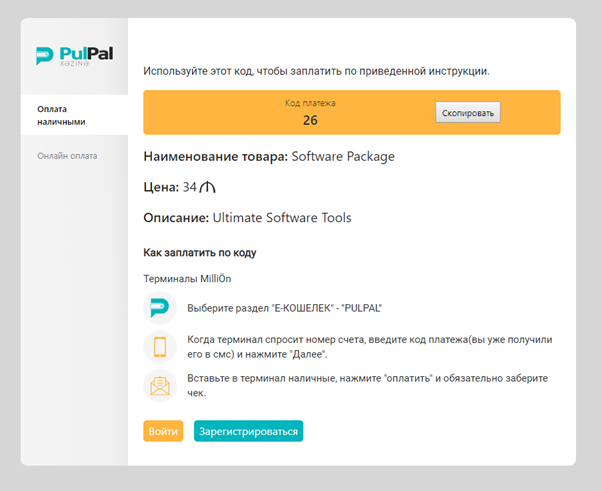
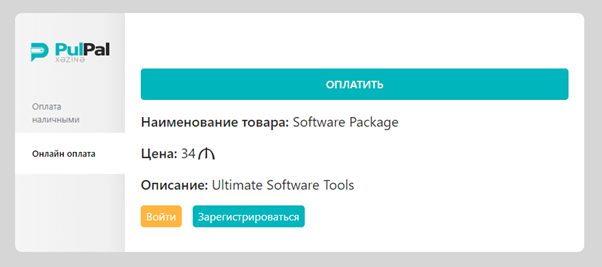
The payment process consists of the following steps:
- The user goes to the PulPal system via the link located on your service
- The user can make online payment through the PulPal service or, having received a unique code, make payment through terminal networks
a)After online payment, the user will be redirected to the Redirect URL - After redirecting to a Redirect URL or payment via a terminal, payment processing starts in PulPal system. After successful completion of the processing, the Delivery method is called with the above parameters.
Payment page changes
Change page language
By default, the language of the payment page is determined based on the browser settings. However, if it becomes necessary to display the payment page in one of the three supported languages, regardless of the user's settings, it is proposed to use the lang parameter, which takes one of three values: az, ru, en. Below are examples of links with the lang parameter.
Query String Parameter Format
| Link for the test environment |
|---|
| https://pay-dev.pulpal.az/payment?lang=az&{parameters} |
| Link for the production environment |
|---|
| https://pay.pulpal.az/payment?lang=az&{parameters} |
Base64 format
| Link for the test environment |
|---|
| https://pay-dev.pulpal.az/payment?lang=az&paymentdata=PaymentData |
| Link for the production environment |
|---|
| https://pay.pulpal.az/payment?lang=az&paymentdata=PaymentData |
Disabling unused languages
Note that you can disable unused languages. In this case, the payment page will be available only in selected languages.
Menu (avatar) > Company profile
In the “Company Profile” section, select the “Languages” tab.

Changing the name of the merchant
The customMerchantName customMerchantName parameter allows you to specify the name of the merchant, which will be displayed on the payment page instead of registered. PulPal stores this name, which allows you to distinguish between payments made under different names.
For all technical questions, contact: [email protected]
Ready-made PulPal solution for payment on the site
The PulPal system allows you to integrate payment options into your application.In order to add a button to your platform, you need to configure the merchant.
| Designations | |
|---|---|
| [DEPRECATED] | Obsolete parameter that will be removed in one of the next updates |
Test and product environments
PulPal provides a test environment for testing integration elements. Login options for the test account will be provided via email; an account for the product environment will be created during conclusion of the contract.
| Link to the merchant’s personal account (test environment) |
|---|
| https://merchant-dev.pulpal.az |
| Link to the merchant’s personal account (product environment) |
|---|
| https://merchant.pulpal.az |
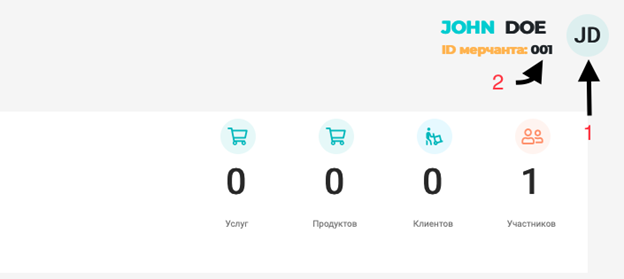
1 - Menu
2 - Merchant ID
Menu (avatar)> Company profile
In the “Company Profile” section, select the “Settings” tab.
Here you must specify the following parameters:

| Parameters | Description |
|---|---|
| Delivery URL | Used to notify your service of payment made |
| Redirect URL | Used to redirect user after successful online payment. |
| Key | Key for signature, provided by the merchant. |
| Salt | “Salt” to verify the merchant, provided by the merchant. |
Request Description
| [POST] Delivery | |
| [JSON] Request body and data types | |
| Price: Int32 | Amount received from the client (in cents) |
| ProductType: Int32 | Type of product (3 - product, 4 - re-pay for product or service) |
| ExternalId: String | Product ID in your system |
| Repeatable: Boolean | Is it possible to pay for this ExternalId more than once |
| Debt: Int32 | Debt for the service (for product is always zero) |
| Amount: Int32 | Product quantity (for service is always zero) |
| ProviderType: Int32 | Type of payment method: 0 -- cash payment, 1 -- credit card payment, 2 -- payment by taxit card, 1000 -- payment by special method |
| PaymentAttempt: String | Unique Payment ID. In case of a repeated request with the same PaymentAttempt, you should ignore it so as not to execute the same payment two or more times. That is, requests with the same PaymentAttempt carry information about the same payment. |
| UserData: String | Əlavə məlumat (bax: Məhsul strukturu email parametri) |
| Expected response | |
|---|---|
| Success | 200 ОК |
| Signature Error | 401 Unauthorized |
| Request failed | 400 Bad Request |
| [GET] Redirect | |
|---|---|
| ExternalId: string | Product ID in your system |
| Status: string | Payment State: success - in case of successful payment, error - in case of an error, canceled - if the user cancel the payment |
| Delivery request signature header | |
| Nonce | A one-time number incrementing by one with each request (starting value 0) |
| Signature | The signature calculated by the following algorithm: 1. String calculation S = URL + Nonce + RequestBody 2.Calculation of byte array H as a result of the hash function HMAC-SHA256 on string S with key Key 3. Calculating a Base64 representation of an H byte array 4. ATTENTION! RequestBody is the original request body string. In case you use the built-in JSON parser and receive the RequestBody by serializing the received object, the correct signature calculation is not guaranteed! |
Why do I need a signature?
Remarks
| Signature clarification | |
| URL | URL where request goes |
| Nonce | See Nonce title |
| RequestBody | JSON request body as a string |
This structure can be transferred to the PulPal system in one of two formats.
Query string parameter format(QueryString)
| Link for the test environment |
|---|
| https://pay-dev.pulpal.az/payment?{parameters} |
| Link for the production environment |
|---|
| https://pay.pulpal.az/payment?{parameters} |
{parameters} — these are fields of the PaymentData structure passed as query string parameters.
| Parameter Name | Parameter value |
|---|---|
| merchantId | Merchant ID in PulPal system (see Note below) |
| productUniqueCode | Unique code |
| price | Product price |
| prices_USD | Product price in dollar* |
| prices_EURO | Product price in euro* |
| price_PROVIDER | Product price for taxit payment methods ** |
| customMerchantName | Merchant Display Name *** |
| externalId | Product ID on your system |
| repeatable | Is it possible to pay for this ExternalId more than once |
| expiresAt: Date (ISO 8601) | The date until which the unique code for the product is valid, for example, 1970-01-01T00: 00: 00Z |
| name_az | Product Name in Azerbaijani |
| name_ru | Product Name in Russian |
| name_en | Product Name in English |
| description_az | Product Description in Azerbaijani |
| description_ru | Product Description in Russian |
| description_en | Product Description in English |
| [DEPRECATED] signature | A signature created using “salt” in the following format:
Signature = SHA1(MerchantId + ExternalId + FromEpoch + Salt)
Here + -- is the string concatenation operation
FromEpoch - the integer part of dividing the number of milliseconds since January 1, 1970 (UNIX era) by 300,000 |
| signature2 | A signature created using “salt” in the following format:
Signature = SHA1(name_en + name_az + name_ru + description_en + description_az + description_ru + merchantId + externalId + price + ExpiresAtEpoch + FromEpoch + Salt)
Here + -- is the string concatenation operation
FromEpoch - the integer part of dividing the number of milliseconds since January 1, 1970 (UNIX era) by 300,000 |
* see “Payment”> “Taxit payment methods”
** see Section “Changing the payment page”> “Changing the name of a merchant”
Why do I need a signature?
ATTENTION!
| Link Example |
|---|
| https://pay-dev.pulpal.az/payment?merchantId=180&price=200&name_az=az&name_ru=ru&name_en=en&description_az=az&description_ru=ru&description_en=en&externalId=44557 |
Request does not have to contain all of the listed parameters.
● If the productUniqueCode parameter value is set, the values of all other fields are ignored.
● If the value of this parameter is not set, a new product is registered in the PulPal system according to the values of other fields in this structure.
● The externalId parameter is used to identify the paid product in your system. This means that in this field you can specify, for example, the order ID or any other information that will identify the purchase in your system.
● If a product with the specified externalId value is already registered in the PulPal system, it is updated in accordance with other structure parameters.
[DEPRECATED] Base64 format
| Link for the test environment |
|---|
| https://pay-dev.pulpal.az/payment?paymentdata=PaymentData |
| Link for the production environment |
|---|
| https://pay.pulpal.az/payment?paymentdata=PaymentData |
PaymentData — is a Base64 format string that is obtained by serializing the JSON object of the Product structure and to which the encodeURI operation has been applied.
Product Structure
| Name and Type | Value |
|---|---|
| merchantId: number | Merchant ID in PulPal system (see Note below) |
| productUniqueCode: string | Unique code |
| price: number | Product price |
| additionalPrices: json | Prices for taxit payment methods in the format: * { "PROVIDER": 1 } |
| customMerchantName: string | Merchant Display Name** |
| externalId: string | Product ID on your system |
| name: json | Product name in three languages in format{ “az”: “...”, “ru”: “...”, “en”: “...”} |
| description: json | Product description in three languages in format{ “az”: “...”, “ru”: “...”, “en”: “...”} |
| expiresAt: Date (ISO 8601) | The date until which the unique code for the product is valid, for example, 1970-01-01T00: 00: 00Z |
| [DEPRECATED] signature: string | A signature created using “salt” in the following format: signature = SHA1(merchantId + externalId + fromEpoch + salt) Here+ - is the string concatenation operation fromEpoch - the integer part of dividing the number of milliseconds since January 1, 1970 (UNIX era) by 300,000 |
| signature2 | A signature created using “salt” in the following format: Signature = SHA1(name.en + name.az + name.ru + description.en + description.ru + description.az + merchantId + externalId + price + ExpiresAtEpoch + FromEpoch + Salt) Here+ -- is the string concatenation operation FromEpoch - the integer part of dividing the number of milliseconds since January 1, 1970 (UNIX era) by 300,000 ExpiresAtEpoch - if parameter passed ExpiresAt, the number of milliseconds, since January 1, 1970 (UNIX epoch), otherwise “” (empty string). |
* Payment in AZN currency, conversion of the issued invoice according to the exchange rate of the Central Bank of Azerbaijan.
** see “Payment”> “Taxit payment methods”
*** see Section “Changing the payment page”> “Changing the name of a merchant”
Why do I need a signature?
ATTENTION!
The paymentData structure does not necessarily have to have all of the fields listed.
● In case the productUniqueCode field value is set, the values of all other fields are ignored.
● If the value of this field is not set, a new product is registered in the PulPal system according to the values of other fields in this structure.
● The externalId field is used to identify the paid product in your system. This means that in this field you can specify, for example, the order ID or any other information that will identify the purchase in your system.
● If a product with the specified externalId value is already registered in the PulPal system, it is updated in accordance with other fields of the structure.
Payment
By click on the button, the user will see the “Payment” window. In the “Payment” window, the user can either pay for the product online, or receive data for payment through terminal networks.
| Test data for online payment | |
|---|---|
| PAN | 4169733213495869 |
| ExpDate | 05/23 |
| CVV2 | 447 |
Remark
Additionally, in the payment window, you will be given the opportunity to log into the system or register in it (see the following screenshot).
The payment process consists of the following steps:
- The user goes to the PulPal system via the link located on your service
- The user can make online payment through the PulPal service or, having received a unique code, make payment through terminal networks
a) After online payment, the user will be redirected to the Redirect URL - After redirecting to a Redirect URL or payment via a terminal, processing of the payment begins in the PulPal system. After successful completion of the processing, the Delivery method is called with the above parameters.
Taxit payment methods
PulPal provides the ability to pay by taxit card. The table below shows the valid values for the PROVIDER parameter:
Kapital Bank BirKart
| PROVIDER Value | Installment period |
|---|---|
| birkart2 | 2 month |
| birkart3 | 3 month |
| birkart6 | 6 month |
| birkart9 | 9 month |
| birkart12 | 12 month |
| birkart18 | 18 month |
Bank of Baku BolKart
| PROVIDER Value | Installment period |
|---|---|
| bolkart1 | 1 month |
| bolkart3 | 3 month |
| bolkart6 | 6 month |
| bolkart12 | 12 month |
| Example for query string parameters | An example for the structure “Product” |
|---|---|
| price_bolkart6=100 | { |
| ... | |
| "additionalPrices": { | |
| "bolkart6": 100 | |
| } | |
| } |
ABB TamKart
| PROVIDER Value | Installment period |
|---|---|
| tamkart3 | 3 month |
| tamkart6 | 3, 6 month |
| tamkart9 | 3, 6, 9 month |
| tamkart12 | 3,6,9,12 month |
| tamkart24 | 3,6,9,12,18,24 month |
| Example for query string parameters | An example for the structure “Product” |
|---|---|
| price_tamkart9=100 | { |
| ... | |
| "prices": { | |
| "tamkart9": 100 | |
| } | |
| } |
Yapi Bank WorldKart
| PROVIDER Value | Installment period |
|---|---|
| worldkart3 | 3 month |
| worldkart6 | 6 month |
| worldkart12 | 12 month |
| worldkart18 | 18 month |
| worldkart24 | 24 month |
Change payment page
Change page language
By default, the language of the payment page is determined based on the browser settings. However, if it becomes necessary to display the payment page in one of the three supported languages, regardless of the user's settings, it is proposed to use the lang parameter, which takes one of three values: az, ru, en. Below are examples of links with the lang parameter.
Query String Parameter Format
| Link for the test environment |
|---|
| https://pay-dev.pulpal.az/payment?lang=az&{parameters} |
| Link for the production environment |
|---|
| https://pay.pulpal.az/payment?lang=az&{parameters} |
Base64 format
| Link for the test environment |
|---|
| https://pay-dev.pulpal.az/payment?lang=az&paymentdata=PaymentData |
| Link for the production environment |
|---|
| https://pay.pulpal.az/payment?lang=az&paymentdata=PaymentData |
Disabling unused languages
Note that you can disable unused languages. In this case, the payment page will be available only in selected languages.
Menu (avatar) > Company profile
In the “Company Profile” section, select the “Languages” tab.
Changing the name of the merchant
The customMerchantName parameter allows you to specify the name of the merchant, which will be displayed on the payment page instead of registered. PulPal stores this name, which allows you to distinguish between payments made under different names.
For all technical questions, contact: [email protected]